Convert any web page to PDF, right inside Chrome

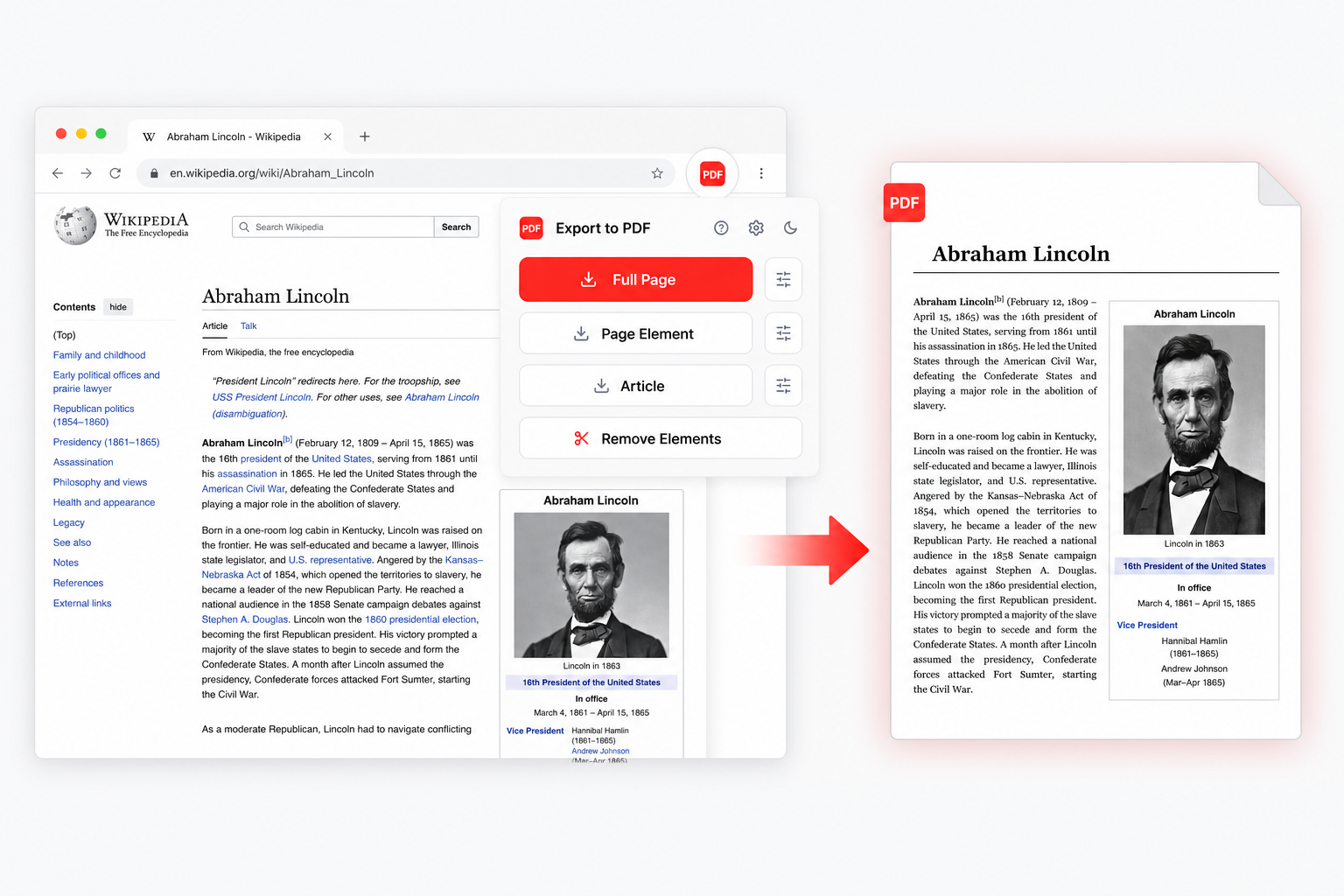
Page to PDF is a free Chrome extension that turns the tab you're looking at into a real vector PDF — whole page, one element, or the article on its own. Text stays selectable, links keep working, and the page never leaves your browser. Deeper breakdown: the web page to PDF converter page.
Add to Chrome Setup in 30 seconds · Free · No account
Page to PDF Chrome extension converting a web page to a clean vector PDF
Features

Four ways to convert a web page into a PDF

Pick the mode that fits what you're saving. Everything is vector, everything stays selectable, everything happens locally.

Full page, end to end

Captures the entire page — even what's still hiding under infinite scroll. Auto-scrolls to trigger lazy-loaded images, hides fixed headers and floating bars, then stitches everything into one clean multi-page PDF.

Pick a single element

Click any block on screen — a card, a chart, a table, a recipe — and export just that. The picker walks the DOM with arrow keys so you nail the exact node, with optional margins and border control.

Article mode

Strips sidebars, ads, comments, popups. Powered by Mozilla Readability — the same engine Firefox uses for Reader View. Clean serif typography, narrow column, adjustable font size.

Remove the noise first

Cookie banners, sticky headers, "subscribe" overlays, chat widgets — point and delete them before export. Ctrl-Z to undo, Esc to cancel. Works on top of any other mode.

Remove Elements

Clean the page before you convert it to PDF.

Point at cookie banners, sticky sidebars, newsletter boxes or chat widgets and remove them before the PDF is generated.

The mode sits on top of every export flow, so you can clean up first, undo with Ctrl-Z if needed, then capture exactly what you want.
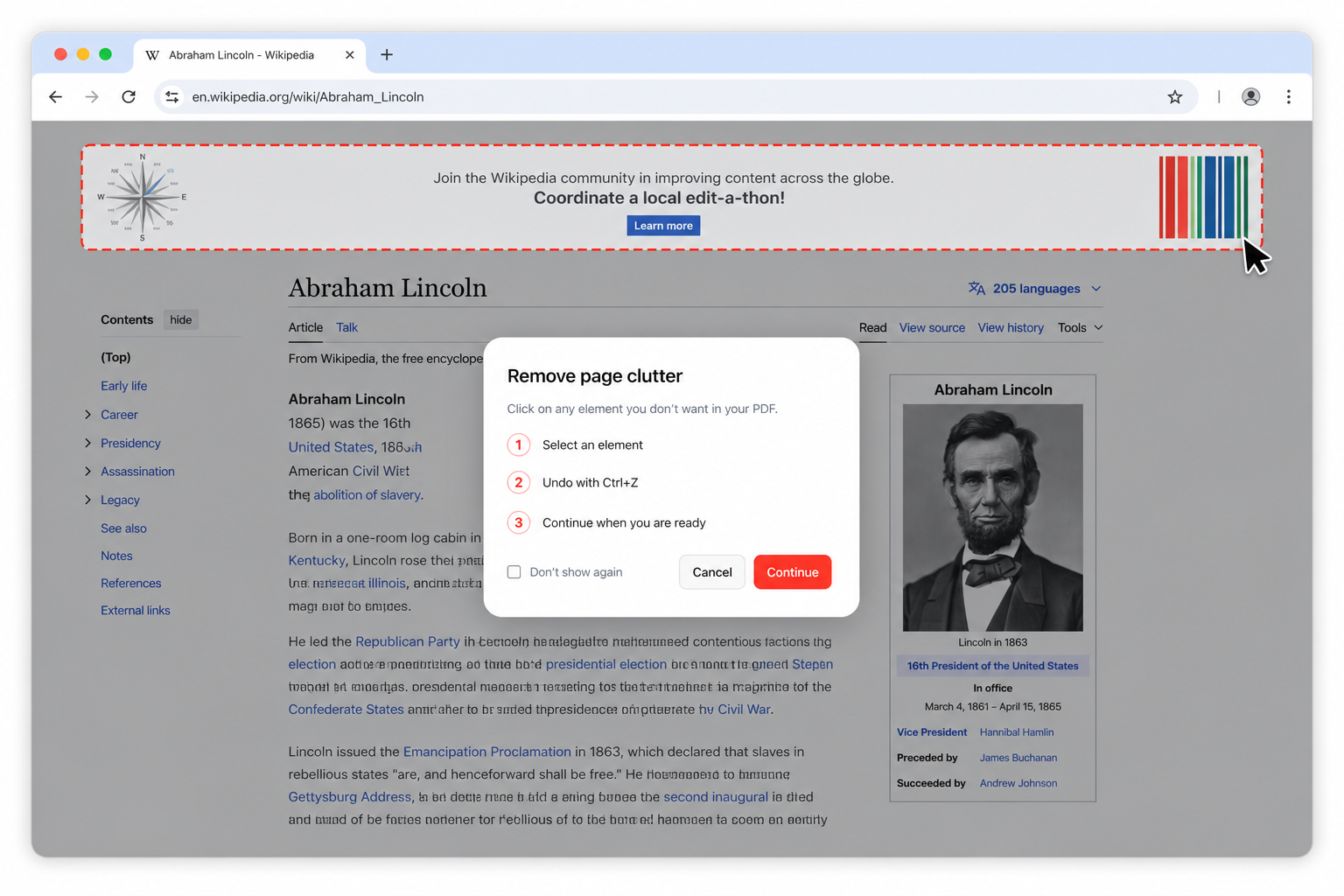
  • Click unwanted page clutter to remove it
  • Undo the last removal without starting over
  • Export the cleaned page as a selectable PDF
Web page to PDF converter — Remove Elements mode highlighting a sidebar before export
Getting started

How to save a web page as PDF in Chrome

Three steps, once. After that it's one click per tab.

1

Pin it to Chrome

Install from the Web Store and pin the icon next to your address bar. No account, no email, no onboarding tour.

2

Open the page you want

An article, a dashboard, a receipt, an internal wiki. Log in first if it needs it — the converter reads the page your browser already rendered.

3

Pick a mode and click

Full page, element, or article. The PDF opens in the built-in viewer the moment it's ready, so you check it before it hits the disk.

To convert page to PDF in a hurry: open it, click the extension, save. Chrome's own Cmd+P works too — it just gives up on lazy images, infinite scroll and sticky headers.

Want the long version? Read the step-by-step guide on how to convert a web page to PDF.

Use cases

Why people convert web pages to PDF

Different jobs, same instinct: what you're reading might not be there tomorrow, and a link is not a document.

Keeping a record

Terms that quietly changed, a listing before it was edited, a policy page on the day it mattered. A saved PDF is dated, offline and out of anyone else's control.

Receipts and confirmations

Flights, hotels, invoices, order summaries. Element mode takes the confirmation block and leaves the twelve upsell banners around it behind.

Reading offline

A long read for a flight or a commute, in Article mode, at a font size you actually chose. No connection, no cookie wall, no autoplaying video.

Sending one page from a wiki

Half the people you work with can't open your internal Confluence. They can open a PDF. So can the client who is not in your SSO.

Research and citations

Sources vanish. Students, journalists and analysts save the page as they saw it, with the text still searchable inside the file.

Bug reports and reviews

The rendered state of a broken page attached to a ticket, or a design in progress marked up and shared. Beats a screenshot nobody can search.

Saving one page is the common case. If you're after a whole site, read the honest version on the website to PDF page — and if the words you use are “download web to PDF” or “internet page to PDF”, that's the web to PDF page.

Vector PDF

Real PDFs. Not screenshots.

Text stays selectable. Links still click through. File sizes stay small. Screen readers, full-text search and your future self can all still get at the content.

Most tools that promise to turn a webpage to PDF rasterize it into one giant image. This one renders through Chrome's own print engine, so what lands on disk is a document — copy-pasteable, searchable, sharp at 400% zoom.
document.pdf PDF
The case for vector exports
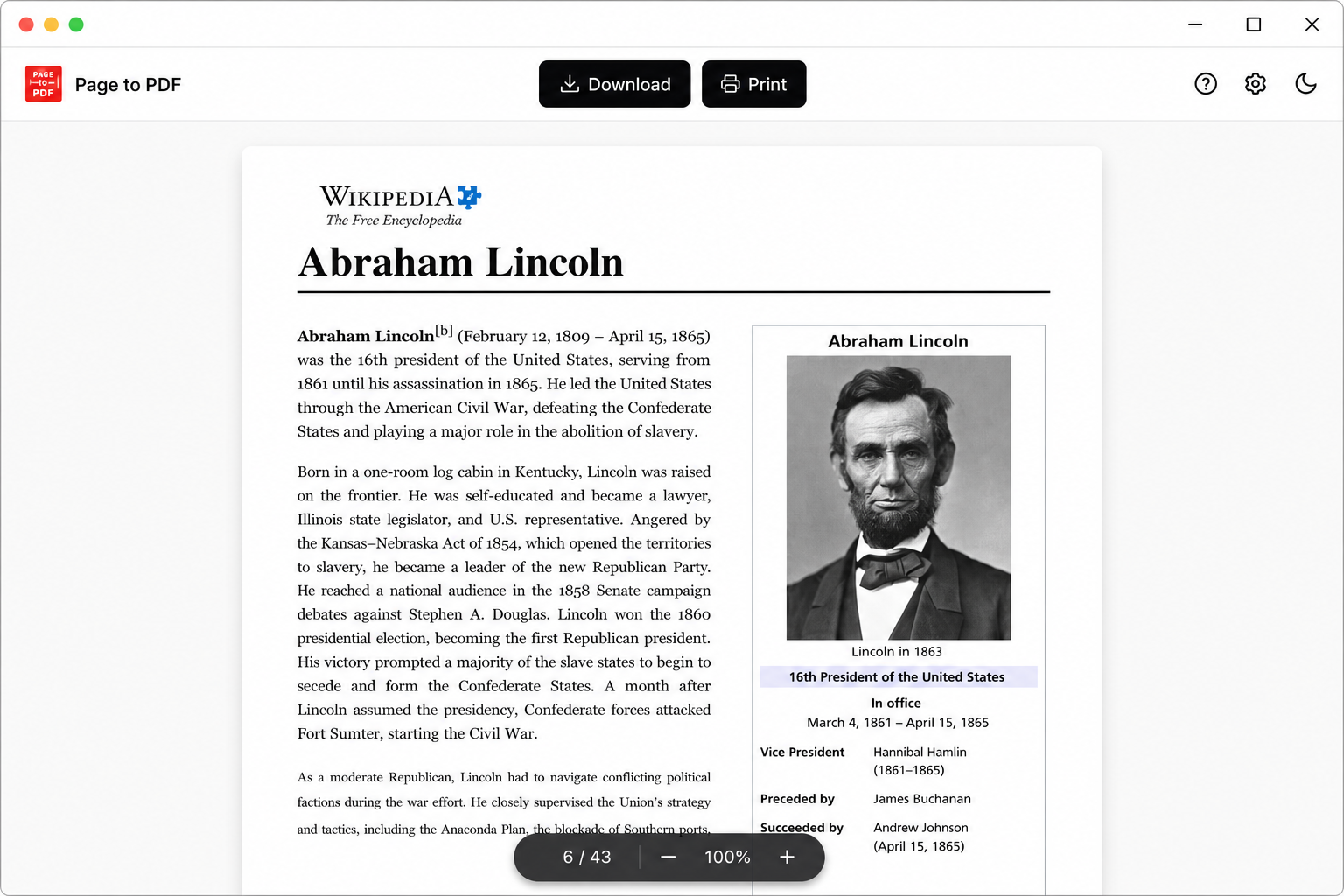
Built-in viewer for the web page to PDF converter — zoom, page navigation and download
Built-in viewer

Preview before you save.

Every export opens in a clean viewer with zoom, page count, file size and one-click download. No surprises after you commit to disk.

Reopen any past export from the viewer's history — the file stays cached locally so you don't have to re-render it if you just want to take another look.

100% Local

Your page never leaves the browser.

Most online "save to PDF" tools upload your URL or your full HTML to their servers. This one doesn't. Generation happens inside Chrome.

That matters when you're saving logged-in dashboards, internal tools, receipts, or anything else that should never end up on a third-party server. No account, no tracking, no cloud.

Stays inside Chrome

HTML, cookies, page content — all rendered locally. Nothing uploaded.

FAQ

Frequently asked questions

How do I save a web page as PDF in Chrome?
Install the Page to PDF extension from the Chrome Web Store, open the page you want, click the icon next to the address bar and pick a mode — Full Page, Single Element, Article or Cleanup. The PDF opens in a built-in viewer ready to download. Setup takes about 30 seconds and every conversion runs inside Chrome, so the page is never uploaded. Full walkthrough: the step-by-step guide.
How is this different from Chrome's built-in "Save as PDF"?
The print dialog captures only what is already loaded, so lazy images print blank and infinite-scroll content is missing. It also stamps sticky headers and sidebars onto every sheet. This extension pre-scrolls the page, hides fixed elements, then renders. It also adds Article mode, the element picker and Cleanup, none of which exist in the print dialog.
Does the text stay selectable?
Yes. The output is a real vector PDF — fonts, links and structure are preserved. You can copy and paste from the file, search inside it with Cmd+F, and screen readers can read it aloud.
Will it work on infinite-scroll feeds?
Yes. The page is scrolled to the bottom first so lazy-loaded images and content actually exist, then captured fully expanded. After the export the tab can reload itself so you are not left at the bottom of a feed you were halfway through.
Why does my converted PDF look different from the web page?
Because a PDF has fixed page dimensions and a web page does not. A layout built for a 1600 px viewport gets reflowed to fit A4, which moves columns around. Two fixes: switch the paper size to landscape or Tabloid, or turn on match window size so the PDF page is exactly as wide as your browser window.
Why is part of the page cut off in the PDF?
Usually a wide table or chart that is broader than the paper. Rotate to landscape, pick a bigger paper size, or use match window size. If one element is the problem, Element mode exports that block on its own page with its own margins.
Why did an online converter give me a login page instead of my content?
Online converters request the URL from their own server, which is not signed in as you. Anything behind authentication comes back as a sign-in screen. An extension converts the page your browser already rendered with your session, so the content is simply there. More on that on the website to PDF page.
Why does converting a long page take a few seconds?
The page is scrolled to the bottom first so lazy-loaded images and infinite-scroll content load before rendering. On an image-heavy page that adds a few seconds. It's the difference between a complete document and one full of blank rectangles.
What paper sizes and orientations are supported?
A3, A4, A5, Letter, Legal and Tabloid, each in portrait or landscape. There's also a match window size option that makes the PDF page as wide as your viewport, plus an option to render an article or element as one continuous page with no breaks at all.
Which browsers does it work in?
Google Chrome and Chromium-based browsers that support Manifest V3 — Edge, Brave, Opera, Vivaldi and Arc. Firefox and Safari use different extension APIs and are not supported.
What data do you collect?
None. The PDF is generated locally in Chrome. No URL, HTML or page content is sent to any server. There's no account, no signup and no analytics inside the extension. The full privacy policy is one click away in the footer.
Are there any limits or paywalls?
No daily limit, no signup, no premium tier, no watermark, no page or character cap. Free.

Stop bookmarking pages you'll never open again.

Free forever, no signup. Convert a web page to PDF in one click and keep a copy nobody can edit, paywall or delete.

Available in the Chrome Web Store